
Keeping an Eye on Your Hives 24/7 — Without Ever Touching the Box
How a small $10 computer and a handful of temperature probes can tell you more about your bees than a weekly inspection.
The Problem Every Beekeeper Knows
You walk out to your apiary on a cold February morning. The hives look fine from the outside — no dead bees piled at the entrance, no obvious trouble. But is the cluster alive? Are they generating enough heat? Did they starve quietly over the last two weeks while you were busy?
The only way to know for sure is to open the hive, and in winter that’s the last thing you want to do. A cold snap during an inspection can kill a cluster that was perfectly fine before you lifted the lid. My hives are insulated, so the thermal camera also gives me no info.
Temperature tells the story without the disruption. A healthy winter cluster sits between 80°F and 95°F at its core. When that warmth disappears, something has gone wrong — and now you can know about it within minutes, not weeks.
What the HiveMonitor Does
The HiveMonitor is a small, always-on device that sits near your hives and silently watches the temperature inside each one, around the clock. Every ten minutes it takes a reading from every sensor, sends the numbers to a website you control, and checks whether anything looks wrong.
If a hive goes cold, you get an alert. If a sensor stops responding, you get an alert. If a reading has been suspiciously flat for hours (a sign the probe may have come loose, or worse, the colony has died), you get an alert. You can look at a graph of every hive going back as long as you want and spot the slow trends — a colony building up in spring, a hot July that’s stressing your top-floor hive, the moment a swarm left and the brood temperature dropped.
All of this happens automatically. You don’t push any buttons. You don’t have to remember to check anything. Your phone buzzes when something needs your attention.
The Hardware — Plain English Version
The brain of the system is a small circuit board about the size of a matchbox called an ESP32. It has built-in WiFi, runs on 5 volts (a standard phone charger), and costs around $8. Think of it as a tiny dedicated computer whose only job is to watch your hives.
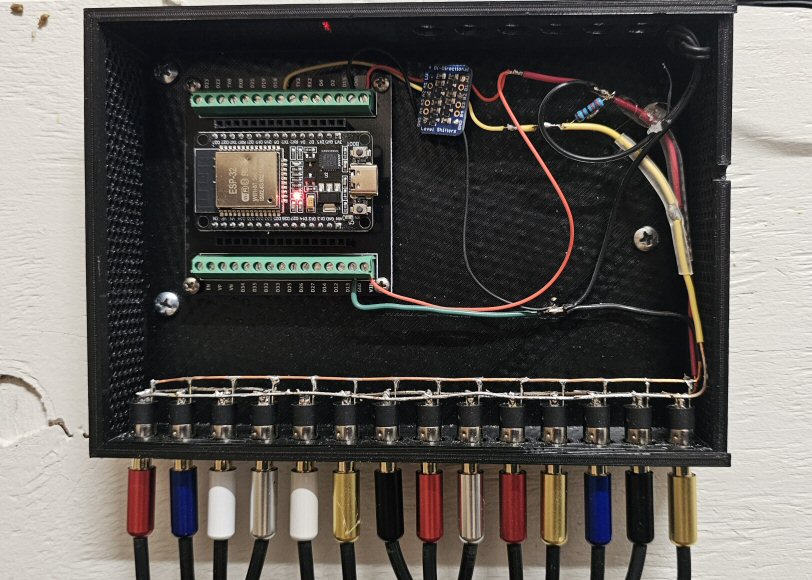
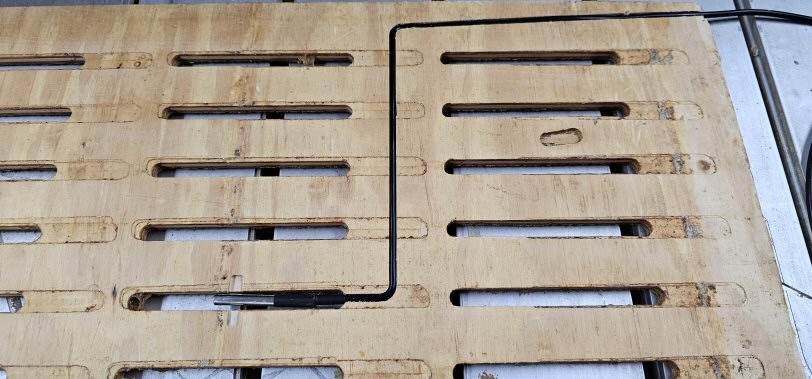
The eyes are DS18B20 temperature probes — thin stainless steel rods about the size of a pencil tip, each on a long cable. They’re accurate to within half a degree Fahrenheit, waterproof, and built to last outdoors for years. Each probe connects to the device through a standard headphone-style jack, so you can plug and unplug them as easily as earbuds. One cable leads from the probe in the slotted divider at the top of the brood boxes, out of the hive and over to the wall. I chose to monitor each brood box — six hives, 2 brood boxes each, so twelve probes total. I also added a single probe at the ceiling of the shed for indoor temperature and one outside the shed for outdoor temperature.
What You Can Monitor
You decide what to watch and where to put each probe. Common setups include:
- One probe per hive in the center of the brood box — gives you the colony temperature year-round
- Two probes per hive — one in the lower brood box, one in the upper — so you can see where the cluster is sitting in winter and whether they’re moving toward their stores
- Ambient probe mounted in the shade outside all the hives — lets you see the temperature difference between outside air and inside the cluster, which is a much better indicator of colony health than raw temperature alone
Each probe gets a name you choose — “Hive 1 Upper,” “Hive 3 Brood,” “Outside Air” — and those names show up everywhere in the system.
The Alerts
You set the rules; the device watches them. For each sensor you can define:
High temperature alert — useful in summer. If a hive gets too hot (above 96°F in the brood area, for example), it may be poorly ventilated, overcrowded, or preparing to swarm. You can also use this to protect nucs or observation hives in direct sun.
Low temperature alert — the critical winter check. If the brood cluster drops below a threshold you set, the device fires an alert immediately. You might set this at 50°F for a winter colony — anything lower and they’re in serious trouble.
Missing sensor alert — if a probe stops reporting (cable chewed by a mouse, connection came loose, probe slipped out of the hive), the device notices after a few cycles and lets you know. You won’t spend the winter thinking you’re watching a colony when you’re actually watching nothing.
Stuck reading alert — if a probe reports exactly the same temperature for several hours in a row, the device flags it as suspicious. A live colony always shows some temperature variation. A perfectly flat line usually means the probe has come loose and is reading room temperature, or the colony has died and the hive has gone cold and stable.
Alerts can be sent to any webhook-compatible notification service — many beekeepers use this with a simple email relay or a service like ntfy.sh so they get a phone notification without needing to set up anything complicated.
The Web Dashboards
The device runs a small private website you can visit from any phone or computer on your home network. Just type hive-monitor.local in your browser — no app to install, no account to create.
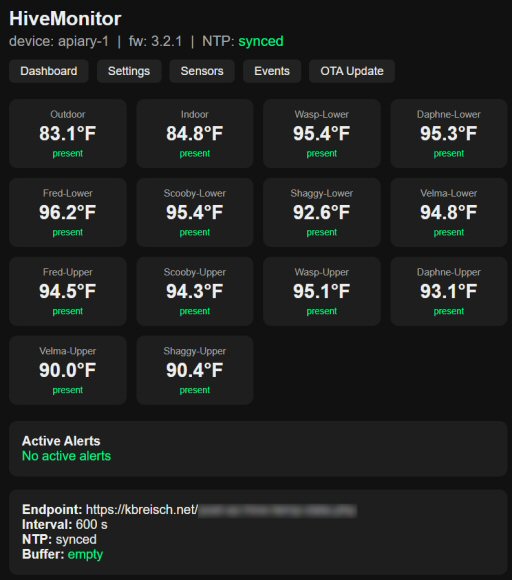
The dashboard shows you at a glance:
- The current temperature for every probe, color-coded green (normal), yellow (warning), or red (alert)
- Which sensors are active and which are missing
- Any active alerts
- How long ago the last reading was taken
- How many readings are queued if the internet connection was temporarily down
There’s also a settings page where you name your sensors, set your alert thresholds, adjust calibration offsets if one probe reads a bit high or low compared to the others, and configure how often the device reports (the default is every 10 minutes).
An event log keeps a running history of every alert, every reboot, every time a sensor went missing or came back — useful when you’re trying to figure out what happened overnight.
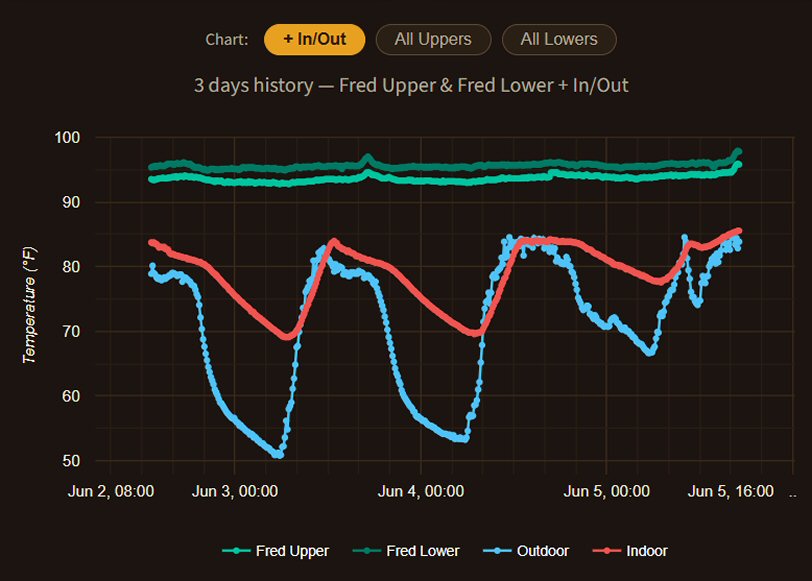
In addition to the built-in web server, the device also posts the temperature data to my website, served up by a public webpage with Google Charts built in.
It also sends data to my WordPress site to show indoor and outdoor temperatures on the upper right of the sites header.
What Happens When the Internet Goes Down
The device keeps working. It stores the last several hours of readings in memory and replays them to the server automatically as soon as the connection comes back. You don’t lose data during a brief outage, and the sensors keep being watched even while the upload is stalled.
Practical Notes for Beekeepers
Power: The device runs on any 5V USB phone charger. A 1-amp charger is plenty even with all 14 probes connected. If you don’t have an outdoor outlet near your hives, a small 10-watt solar panel and a USB power bank will run it indefinitely.
WiFi range: Standard home WiFi reaches 100–150 feet outdoors without any special equipment. If your hives are farther than that, a cheap WiFi range extender or a long ethernet cable to a second router will bring the signal to the apiary.
Weatherproofing: No need — my device is in the bee shed. However, if you were to build your own, the system could be protected with a good outdoor electrical box.
Replacing a probe: If a probe fails, you swap it out in two steps through the web interface — clear the old one from its slot, then plug in the new probe and assign it. No programming, no tools.
Calibration: If you compare probes side by side and one reads 1.5°F higher than the others, you can dial in a correction offset for that probe through the settings page. The adjustment is stored permanently and applied automatically to every future reading.
The Bigger Picture
Temperature monitoring doesn’t replace inspections — nothing does. But it fills in all the time between inspections with real information instead of guesswork. It tells you when to open a hive because something needs attention, and it gives you confidence to not open a hive when everything looks steady and healthy.
For winter management especially, it changes the relationship entirely. Instead of the anxious wait between November and March wondering whether your colonies made it, you watch the temperature curves tick along, see the cluster moving up through the frames as they consume their stores, and know immediately if something changes. It’s the difference between flying blind and having instruments.
Beekeeping has always been about reading your bees. This just gives you one more way to listen.
Parts and Cost
| Part | Approximate Cost |
|---|---|
| ESP32 development board | $8 |
| DS18B20 probe with cable (per sensor) | $4 |
| Logic level converter (for 8+ sensors) | $10 |
| 3D-printed weatherproof enclosure | $0.50 |
| Power Supply | $6 |
| Total for a 4-hive setup | ~$45 |
| Total for my 6-hives | ~$60 |
The software is custom. There are no subscription fees, no cloud service to depend on, and no data leaving your property unless you choose.
Leave a Reply